Ways to Use Improv
Improv is one modeling engine with several front ends. They all work on the same model: categories, items, measures, formulas, input cells and saved views. A model built in one opens in every other. Pick the one that fits the job, and switch when the job changes.
| You want to… | Use | Where the model lives |
|---|---|---|
| explore a model, pivot it, edit numbers, add formulas with a mouse | the desktop GUI | a store file, or Postgres |
| do the same over SSH or in a terminal | the TUI | a store file, or Postgres |
| script a model, build it in CI, diff it, load data in bulk | the CLI | a store file, or Postgres |
| push a live feed through a model and get the changed results out | streaming | a store file, or Postgres |
| model data that already lives in Postgres, and read results with SQL | pg_improv | Postgres tables plus the improv catalog |
| write a SQL function as a formula | LANGUAGE improv | the function body |
| run a formula or a model over data in DuckDB, from SQL | the DuckDB extension | nowhere: computed per query |
| serve a model to other programs over HTTP | the server | a store file, or Postgres |
The model, wherever it lives
A store file (model.db) is a single SQLite file holding the model as
Mentat datoms: one file to copy, mail or check in. Every
front end takes its path.
A Postgres model is named by a URL instead of a path:
postgres://user@host/database?model=plan
Pass that URL to the CLI, TUI, GUI or server and they work on the model
stored in that database's improv schema. When the pg_improv extension is
installed, input measures can be bound to columns of your own tables:
the GUI then edits those rows, and SQL sees every result. See
Improv in Postgres.
Two writers never silently overwrite each other. If someone else saved after
you loaded, your save is refused with a conflict; choose File ▸ Revert to
Saved (GUI) or press R (TUI) to pick up their changes, then redo yours.
The desktop GUI (improv-gui)
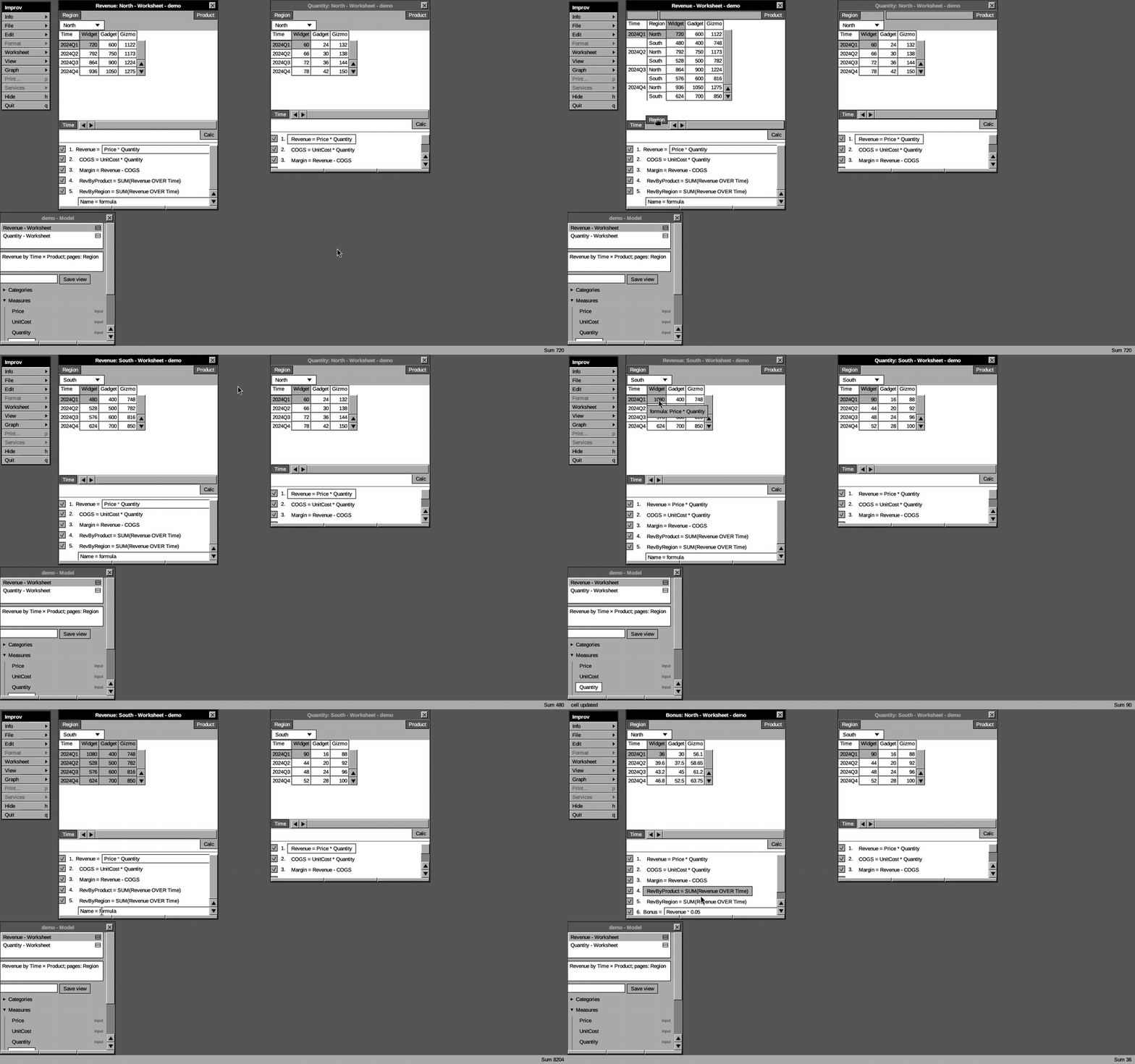
Use it for: building and exploring a model by hand. You see several views at once, pivot by dragging, chart, and watch derived cells recompute as you type.
improv-gui sample.db
improv-gui 'postgres://me@127.0.0.1/sales?sslmode=disable&model=plan'
- Pivot: drag a category tile between a worksheet's strips. Page tiles go top-left, column tiles top-right, row tiles in the bottom strip.
- Edit: double-click a cell. Derived cells are read-only; hover one to see its formula.
- Add a formula: type
Margin = Revenue - COGSon the last line of the formula list. - More views: Worksheet ▸ Add Matrix opens another worksheet on the same model; Save View keeps the arrangement.
Every change is saved as you make it. The Desktop GUI walks through each window.
The terminal UI (improv-tui)

Use it for: the same pivot-and-edit loop without a display, over SSH, or in a tmux pane next to your logs.
improv-tui sample.db
| Key | Does |
|---|---|
| arrows, click | move |
e / Enter | edit the input cell (derived cells recompute live), or a derived measure's formula; a parse error is marked under the bad token, with a hint |
Tab / m | next measure |
p | pivot |
[ ] | page |
| Shift+arrows | select a range; its sum shows in the status line |
f / F | hide a row item / clear filters |
S / v | save the layout as a view / cycle views |
I / E | import / export CSV |
R | revert to the saved model |
| Tab (in a formula) | complete a function, measure or category name; again to cycle |
? / F1 | search the functions; Enter inserts NAME( into the edit |
q | quit and save |
The CLI (improv)
Use it for: anything you want to repeat. Build a model from a script, load a CSV or SQL query into a measure, evaluate a formula in CI, export results, or check a model into git as the script that builds it.
improv init m.db
improv add-category m.db 1 Time;    improv add-item m.db 10 1 Q1
improv add-category m.db 2 Product; improv add-item m.db 20 2 Widget
improv add-measure m.db 100 Price    number input Product
improv add-measure m.db 101 Quantity number input Time Product
improv set m.db 100 10  --at Product=Widget
improv set m.db 101 100 --at Time=Q1,Product=Widget
improv define m.db 102 "Revenue = Price * Quantity"
improv eval m.db 102
It also imports and exports CSV and SQLite (import-csv, import-sql,
refresh-sql, export-csv, export-sql), runs Python functions in a
sandbox (register-ext, CALL(...)), and keeps external measures fresh on a
schedule (serve-refresh). Getting Started is a
tutorial; man improv lists every command.
Streaming (improv stream)
Use it for: a live feed. Something produces new numbers, and you want the derived results that change, as they change, without recomputing the model.
tail -F prices.log | improv stream m.db Revenue Margin | your-consumer
Each input line is <measure> <value> [Cat=Item,...]. Improv applies it to
a live incremental engine and prints only the target cells it changed:
$ printf 'Price 15 Product=Widget\nQuantity 8 Time=Q1,Product=Widget\n' \
    | improv stream m.db Revenue
Revenue Time=Q1, Product=Widget = 1500
Revenue Time=Q1, Product=Widget = 120
(Price 15 × the stored Quantity 100, then 15 × the new 8.)
A bad line is reported on stderr and skipped. At end of input the final state is saved to the model.
In Postgres (pg_improv)

Use it for: data that already lives in Postgres. Bind your table's columns to categories and measures, define formulas, and read results from ordinary tables, with no export step and no second copy.
CREATE EXTENSION pg_improv;
SELECT improv.create_model('plan');
SELECT improv.bind_category('plan', 'Time',    'sales', 'quarter');
SELECT improv.bind_category('plan', 'Product', 'sales', 'product');
SELECT improv.bind_measure ('plan', 'Price',    'sales', 'price');
SELECT improv.bind_measure ('plan', 'Quantity', 'sales', 'qty');
SELECT improv.define('plan', 'Revenue = Price * Quantity');
SELECT * FROM improv_plan.revenue;     -- kept current as sales changes
Choose how results follow your writes:
logical(default): a background worker applies committed changes incrementally, so writers pay nothing. At 100k cells a one-row change is visible about 50 ms after commit.trigger: results update inside the writer's own transaction.improv.recalc(): results update when you call it, in your snapshot.
Open the same model in the GUI or TUI with its postgres://…?model=plan
URL: editing a cell there updates the row in sales.
Improv in Postgres covers setup, value types, aggregated
bindings and durability, and A Family's Finances
is a complete worked example.
In DuckDB (the improv extension)
Use it for: analytics over data DuckDB already reads (tables, Parquet, CSV): a formula as a column, or a model over a table, inside one query. Nothing is stored; each query reads its source and computes.
LOAD improv;
SELECT improv_calc('ROUND(PMT(rate/12, n, -pv), 2)',
                   json_object('rate', rate, 'n', n, 'pv', pv)) FROM loans;
SELECT * FROM improv('sales', '
  category Time = year
  category Product = product
  input Price = price
  input Quantity = qty sum
  Revenue = Price * Quantity
  Share = Revenue / SUM(Revenue OVER Product)');
improv(...) returns one row per computed cell (measure, a column per
category, value, value_text), so the result joins and pivots like any
table. improv_functions() lists the built-in functions.
Improv in DuckDB has the details.
SQL functions (LANGUAGE improv)
Use it for: a calculation you want in plain SQL, written as a formula. No model is needed.
CREATE FUNCTION bonus(sales float8, target float8) RETURNS float8
  LANGUAGE improv IMMUTABLE AS $$
    Ratio = sales / target
    MAX2(Ratio - 1, 0) * 1000
  $$;
SELECT rep, bonus(sales, target) FROM quota;
Arguments are the inputs, by name; each Name = expr line is an
intermediate; the last line is the result. A call costs about 0.14–0.24 µs
(this two-line bonus is the 0.24), about what PL/pgSQL costs.
The HTTP server (improv-server)
Use it for: letting another program read a model, ask what-if questions, or write input cells over HTTP.
With the model m.db from the CLI example, after the
streaming example set Price to 15:
IMPROV_API_TOKEN=secret improv-server m.db 127.0.0.1:3000 &
curl -H 'Authorization: Bearer secret' -X POST localhost:3000/measures/102/eval \
  -H 'content-type: application/json' \
  -d '{"edits":[{"measure":101,"coord":[[1,10],[2,20]],"value":90}]}'
# [{"coord":[["Product","Widget"],["Time","Q1"]],"value":1350.0}]
An edit names its measure and coordinate by id ([[category, item], …]);
the answer comes back by name. /eval computes through the live engine and
writes nothing unless you ask it to ("persist": true). The HTTP Server lists the routes,
tokens and limits.
Choosing quickly
- One person, a model to think with: GUI, or the TUI over SSH.
- A model that is code: a CLI script in git, then open it in the GUI.
- A feed of numbers:
improv stream. - Data in Postgres, results for SQL users:
pg_improv,logicalmode. Usetriggerif a writer must read its own results in the same transaction. - A formula as a SQL function:
LANGUAGE improv. - Data in DuckDB, Parquet or CSV, answers in one query: the DuckDB
extension (
improv_calc,improv(source, model)). - Another service needs answers:
improv-server.